
Mass Notification vs Emergency Management Software for Buildings
Mass notification vs emergency management software comes down to whether your team only needs to send alerts or also needs to manage the emergency program behind them.
A mass notification system can help broadcast urgent messages. WPS Evac Software goes further by connecting tenant messaging with building-specific plans, emergency procedures, floor warden roles, Persons Requiring Assistance (PRA) information, drills, training records, roll call, and reporting.
For property managers, building owners, facility managers, condo and strata managers, and operations leads, the question is not whether alerts matter. The better question is whether a notification-only tool gives your team enough structure before, during, and after an emergency.
- 40+ years
- Thousands of buildings
- SOC 2 compliant












Why Alerting Tools Alone Can Fall Short
Notification-only tools can send messages quickly, but they do not necessarily maintain the emergency plan, people, training, and records that make response work.
Many teams already have email lists, tenant portals, form builders, inspection software, or critical communications tools. Those systems may help with one part of the job, but building emergency readiness also depends on current procedures, trained roles, accurate PRA information, organized drill records, and a way to review what happened afterward.
In a building incident, the operational problem is rarely "can we send a message?" It is whether the right users know their role, have access to the current procedure, can respond through the right workflow, and leave managers with usable records for follow-up.
What Is the Difference Between Mass Notification and Emergency Management Software?
Mass notification is a tool for sending urgent messages to groups, while emergency management software organizes the plans, people, procedures, communication, accountability, and records around the response.
Sends the alert
Mass notification systems usually focus on speed, reach, delivery channels, templates, two-way replies, acknowledgments, and reporting. That can be a strong fit for organizations that already have mature emergency plans, current contact data, trained response teams, and separate systems for documentation.
- speed
- reach
- delivery channels
- templates
- two-way replies
- acknowledgments
- reporting
Manages the program behind the alert
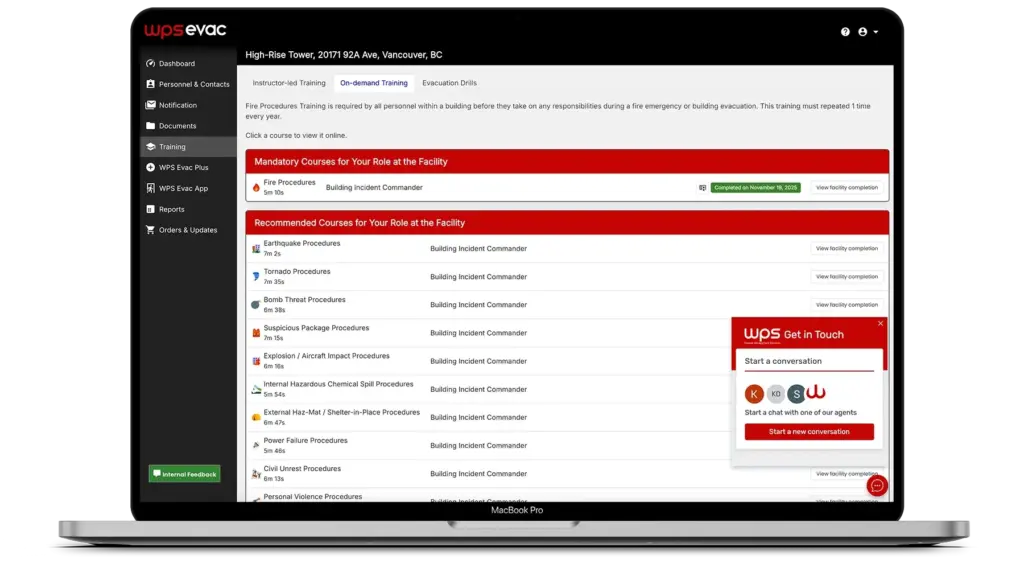
Emergency management software is broader. Commercial WPS Evac Software & App combines centralized plan and document management, task alerts, Corporate / Managers / Tenants access levels, tenant responsibilities, floor warden and PRA workflows, communication templates, SMS or email broadcasts, drill records, training completion records, emergency contacts, roll call, and reporting.
- centralized plan and document management
- task alerts
- Corporate / Managers / Tenants access levels
- tenant responsibilities
- floor warden and PRA workflows
- communication templates
- SMS or email broadcasts
- drill records
- training completion records
- emergency contacts
- roll call
- reporting
How WPS Evac Turns Tenant Alerts Into Emergency Program Management
WPS Evac works by connecting communication to the building-specific emergency plan, assigned roles, mobile procedures, roll call, and records.
1. Start with the plan
WPS Evac Software stores fire safety plans, multi-hazard plans, procedures, and related documents in one cloud-based system. Teams can connect the platform with fire safety plans and multi-hazard emergency plans.
2. Assign the right access
Commercial WPS Evac Software & App supports Corporate, Managers, and Tenants access levels. Corporate users can monitor portfolio activity, Managers can oversee building-level tasks, and Tenants can help maintain floor warden teams and PRA information.
3. Put procedures in the WPS Evac Mobile App
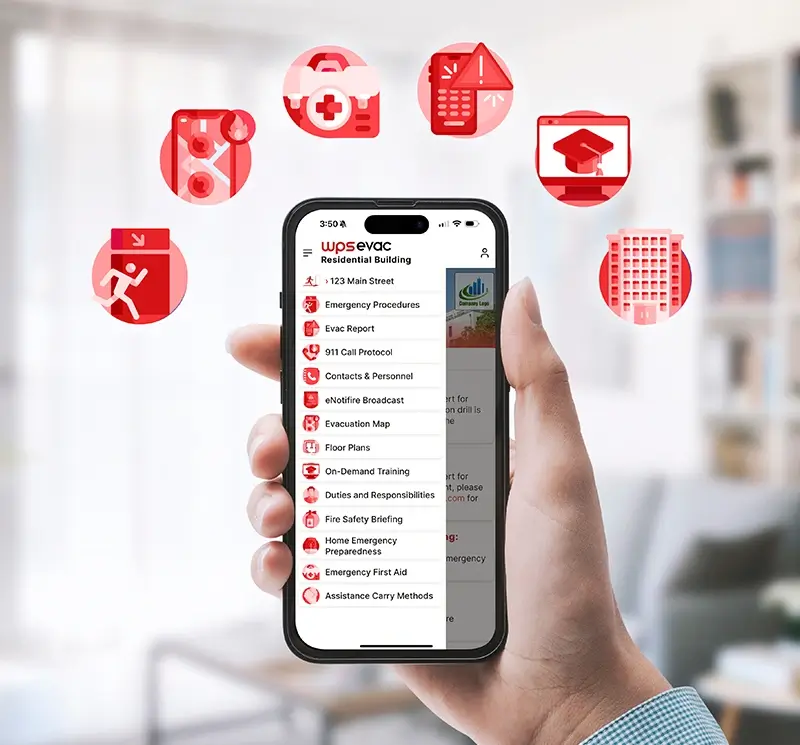
The WPS Evac Mobile App gives authorized users access to building-specific emergency procedures, including role-based instructions for staff, wardens, occupants, and other configured users.
4. Send targeted communications
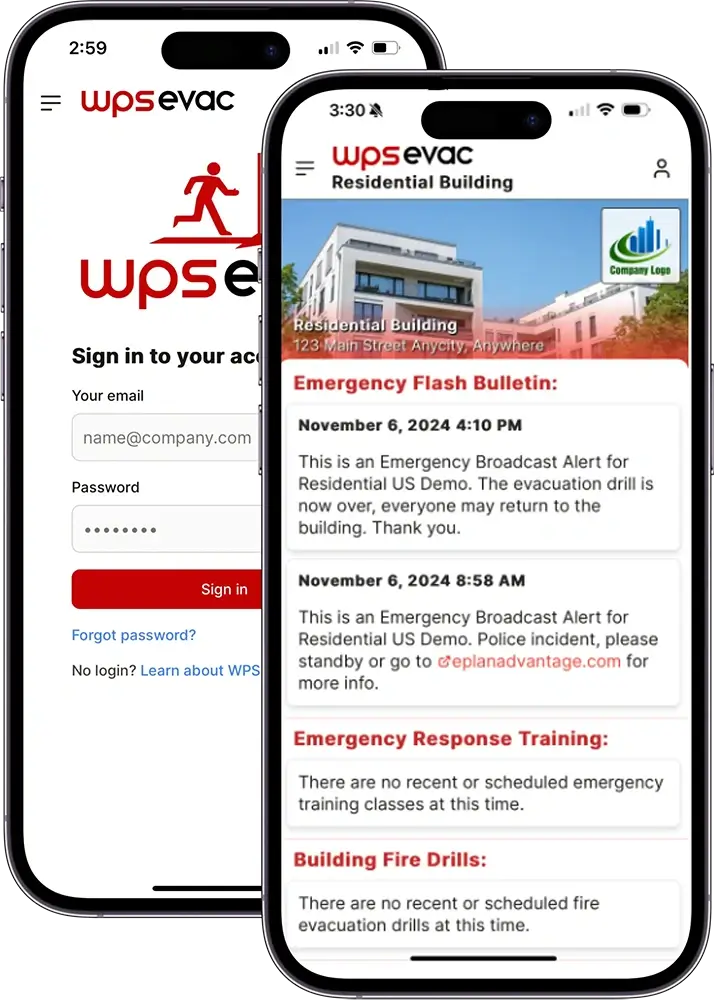
Commercial teams can use communication templates and SMS or email broadcasts to registered personnel or groups. Residential WPS Evac App and Software supports real-time tenant notifications through SMS, text-to-speech, and email where available.
5. Run roll call and review activity
Commercial WPS Evac supports evacuation status and roll call through check-in and alert reporting tools. Managers can review drills, training, emergency contacts, notifications, activity logs, and related records after an exercise or incident.
Mass Notification Alternative for Commercial Real Estate
Commercial WPS Evac Software & App is built for office, mixed-use, and portfolio environments where emergency readiness depends on property teams, tenants, and designated emergency roles.
For commercial properties, a tenant alert system comparison should include more than message delivery. WPS Evac helps property teams manage building documents, compliance task alerts, delegated tenant responsibilities, floor warden teams, PRA information, communication templates, training records, drill records, emergency contacts, roll call, and reporting.
This makes it different from generic alerting tools, form builders, or inspection-only systems. Those tools can be useful, but they may not connect the commercial emergency plan with the people expected to carry it out.
Tenant Alert System Comparison for Residential Properties
Residential WPS Evac App and Software focuses on tenant communication, emergency procedures, app adoption tracking, evacuation status, automated roll call, and residential activity records.
For apartments, condominiums, strata communities, and other multi-family properties, the priority is resident-facing communication and participation. Residential WPS Evac gives tenants access to clear emergency procedures and allows property management to initiate mass phone-broadcast roll call during an evacuation.
Residential WPS Evac also supports tracking and confirming tenant installation of the app, maintaining key preparedness information, and helping managers review notification and safety-related activity. Residential feature availability and launch status should be confirmed before final publication if the page describes app-based workflows in detail.
How WPS Evac Connects Critical Communications to the Rest of the Program
Emergency communication is stronger when it connects to the plans, roles, training, and records that support the message.
- Store plans, procedures, and documents with Commercial WPS Evac Software & App.
- Use Residential WPS Evac App and Software for residential alerts, roll call, participation tracking, and tenant procedures.
- Assign on-demand training with automatic completion records through on-demand emergency training.
- Add facilitated learning through instructor-led emergency training where needed.
- Give authorized users mobile access through the WPS Evac App download page.
- Connect PRA information with WPS guidance on assisting Persons Requiring Assistance during emergencies.
- Extend the same platform beyond fire using comprehensive emergency management beyond fire hazards.
Is a Mass Notification System Enough for Building Fire Safety Compliance?
No software alone makes a building compliant, and requirements vary, but many U.S. and Canadian frameworks expect more than simply sending an alert.
In the United States, OSHA 29 Code of Federal Regulations 1910.38 addresses written emergency action plans where required, evacuation procedures, accounting for employees after evacuation, alarm systems, employee training, and plan review. International Fire Code Chapter 4 is another U.S. fire-code example that addresses emergency planning and preparedness for certain occupancies.
In Canada, National Fire Code-based fire codes and Canadian Centre for Occupational Health and Safety guidance commonly address fire safety plans, evacuation procedures, supervisory staff duties, occupant instruction, drills, fire protection systems, and records. WPS Evac can support this operational work, but teams should confirm applicable obligations with local authorities.
Requirements vary by building type and jurisdiction. Confirm applicable obligations with local authorities.
How to Move From Notification-Only to WPS Evac
WPS Evac can be introduced as a practical upgrade when your team needs alerts, plans, roles, roll call, training, and records in one building-focused workflow.
- Review the existing emergency plan, contact lists, tenant responsibilities, and recordkeeping process.
- Confirm whether the building needs Commercial WPS Evac Software & App, Residential WPS Evac App and Software, or both.
- Configure Corporate, Managers, and Tenants access where appropriate.
- Add emergency procedures, contacts, floor warden details, PRA information, training assignments, and supporting documents.
- Use communication templates, notifications, roll call, training records, and reporting during drills or real events.
- Add WPS Evac Plus if the team wants WPS support with digital fire and life-safety administration.
Every new WPS Fire Safety Plan or Multi-Hazard Emergency Plan includes a free 1-year WPS Evac subscription, helping teams move from planning into live emergency-management software.
Mass Notification vs Emergency Management Software
Mass notification vs emergency management software is the difference between sending emergency messages and managing the full building emergency program around those messages.
What does it do?
Mass notification sends urgent alerts through channels such as SMS, voice, email, or mobile notifications. Emergency management software adds the operational layer: building plans, procedures, assigned roles, training, PRA information, roll call, activity records, and follow-up reporting.
How does WPS Evac handle it?
WPS Evac Software includes mass notification capabilities, but also connects them to Commercial WPS Evac Software & App workflows, Residential WPS Evac App and Software workflows, mobile procedures, Corporate / Managers / Tenants access levels, training completion records, drill records, and WPS Evac Plus support.
Who is it for?
It is for property managers, building owners, facility managers, condo and strata managers, operations leads, commercial tenants, floor wardens, and residential management teams comparing a notification-only system with a building-specific emergency-management platform.
Mass Notification vs Emergency Management Software FAQs
These answers help property teams compare mass notification systems, emergency management software, tenant alert tools, and WPS Evac.
What is the difference between mass notification and emergency management software?
Mass notification software sends urgent messages to groups. Emergency management software manages more of the response program, including plans, procedures, roles, training records, drill records, PRA information, roll call, and reporting. WPS Evac includes communication tools while also organizing the building-specific emergency workflow.
Do property managers need a mass notification system?
Property managers often need a reliable way to reach tenants, staff, wardens, or building personnel quickly. The bigger question is whether notification alone is enough. WPS Evac is designed for teams that also need plans, procedures, roll call, training records, tenant participation, and emergency documentation.
Is a mass notification system enough for building fire safety compliance?
Usually, notification software by itself is not the full requirement. OSHA 29 Code of Federal Regulations 1910.38 and National Fire Code-based Canadian requirements are examples of frameworks that may address plans, evacuation procedures, training, drills, duties, or records. Requirements vary, and WPS Evac does not make a building compliant by itself.
Requirements vary by building type and jurisdiction. Confirm applicable obligations with local authorities.
How is WPS Evac different from a tenant alert system?
A tenant alert system focuses on sending messages. WPS Evac connects tenant communication with emergency procedures, plan documents, delegated responsibilities, PRA information, roll call, training records, drill records, emergency contacts, and activity logs, depending on whether the property uses commercial or residential workflows.
Can WPS Evac replace our existing notification tool?
It may replace a notification-only tool when the building needs emergency communication connected to plans, roles, training, roll call, and records. Some teams may still keep other tools for broader business communication, but WPS Evac should be evaluated as the emergency-management platform for building safety workflows.
How long does WPS Evac take to set up?
Setup depends on the number of properties, plan documents, user groups, tenant responsibilities, and data that must be configured. WPS typically starts with the building’s emergency plan, access levels, procedures, contacts, training needs, and communication workflows before launching the software.
What if tenants do not download the app?
Residential WPS Evac supports tenant app-installation tracking so managers can monitor adoption efforts. It also supports SMS, text-to-speech, email, and phone-broadcast roll call where available, which helps teams communicate and collect status without relying only on app behavior.
Request a WPS Evac Software Demo
After the form is submitted, a WPS representative will contact you to discuss your building type, current emergency-management process, and the best WPS Evac setup for your properties.