
Digital Fire Safety Plan Software for Buildings
Digital fire safety plan software gives property teams one cloud-based place to manage emergency plans, procedures, training records, and mobile access.
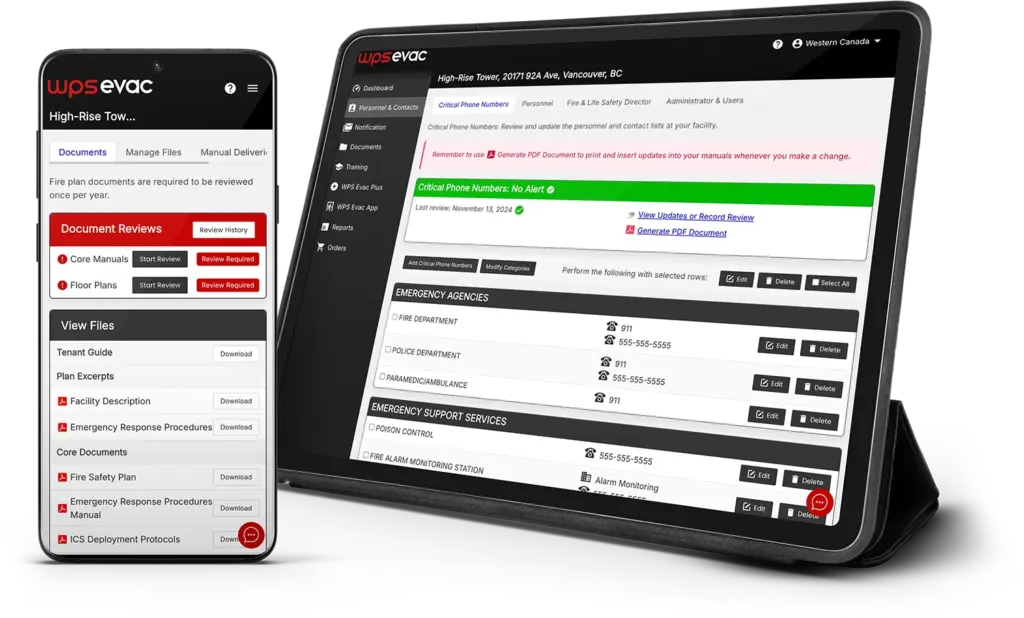
WPS Evac Software helps commercial, mixed-use, and residential building teams move beyond static binders by centralizing fire safety plans, multi-hazard procedures, documents, communications, training records, and evacuation tools. With the WPS Evac App / WPS Evac Mobile App, authorized staff, wardens, tenants, and occupants can access building-specific procedures from the devices they already carry.
- 40+ years
- Thousands of buildings
- SOC 2 compliant












Why Fire Safety Binders Go Stale
Manual binders fall behind because building details, tenant rosters, staff roles, training records, and procedures change faster than paper can be updated.
A printed binder may still be required as the approved on-site copy, but it is not a practical day-to-day management system. When emergency contacts, floor wardens, Persons Requiring Assistance (PRA), procedures, drills, or tenant responsibilities change, teams need a way to keep the working version current without chasing multiple files and copies.
That is why property teams use digital tools alongside approved plans, training, and review processes. WPS supports this through building-specific fire safety plans, multi-hazard emergency plans, and WPS Evac Software.
What Is a Digital Fire Safety Plan?
A digital fire safety plan is an electronic version of a building’s emergency plan and related procedures, managed in software and made accessible to authorized users.
For WPS Evac, the digital plan experience sits inside a broader emergency-management platform. Commercial WPS Evac Software & App centralizes emergency plans, documents, compliance tasks, drills, personnel, training records, reporting, notifications, and mobile access for commercial and mixed-use properties.
A digital fire safety plan is not a shortcut around code review, approval, training, or local requirements. It is a practical way to keep the working plan organized, accessible, and easier to maintain between formal updates.
Plan
Documents
Roles
Training
Notifications
App Access
How Digital Fire Safety Plan Software Keeps Information Current
Digital fire safety plan software keeps the active emergency plan connected to the people, roles, and procedures that change over time.
1. Centralize the approved plan and emergency documents
Upload and manage fire safety plans, multi-hazard plans, emergency procedures, related documents, and key building records in WPS Evac Software.
2. Assign access by role
Commercial WPS Evac Software supports Corporate, Managers, and Tenants access levels, so portfolio leaders, building teams, and tenant contacts can each manage the responsibilities assigned to them.
3. Keep procedures available in the app
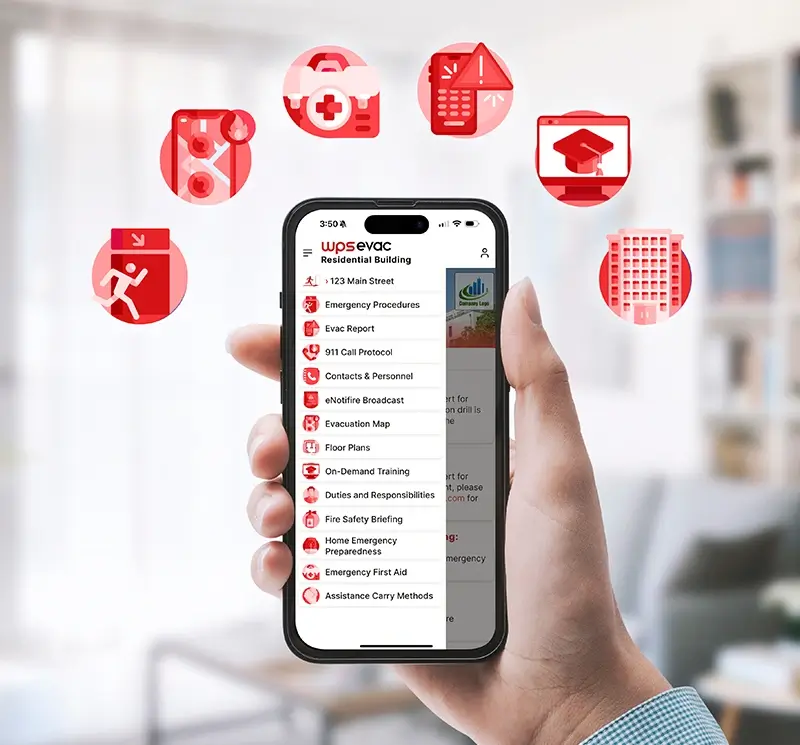
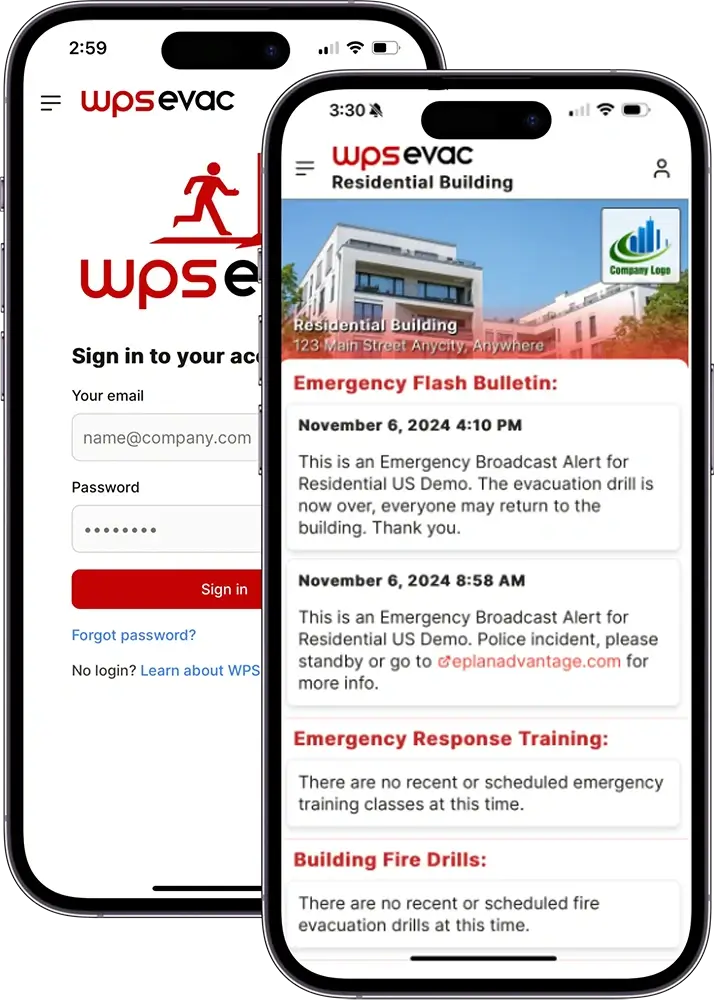
The WPS Evac App gives building emergency personnel and occupants mobile access to emergency procedures, alerts, roll call tools, and building-specific information where configured.
4. Update information in one place
When procedures, contacts, floor warden teams, or PRA information change, updates can be managed centrally so users see current information through the software and app.
5. Support training and records
WPS on-demand training can be assigned through the platform, with automatic completion records to help managers track participation and maintain an audit trail.
6. Review alongside drills and plan updates
Use drill activity, training records, tenant updates, and building changes to identify what should be reviewed in the plan and supporting procedures.
Fire Safety Plan Software for Commercial and Mixed-Use Properties
Commercial WPS Evac Software & App is built for property managers and building teams that need shared emergency-plan oversight across one building or a portfolio.
Corporate
Corporate users can monitor plan status, task completion, and training activity across multiple properties.
Managers
Managers can oversee building-level documentation, drills, training, emergency personnel, notifications, and reporting from a centralized dashboard.
Tenants
Tenants can use the tenant application to maintain floor warden teams and identify Persons Requiring Assistance.
This makes WPS Evac useful for property managers who need tenant participation without handing every user the same level of access.
Mobile Fire Safety Plan for Staff and Tenants
Residential WPS Evac App and Software focuses on tenant communication, emergency procedures, evacuation accountability, and preparedness for residential communities.
For condominiums, strata, apartments, and other multi-family properties, the residential platform supports real-time notifications, emergency procedures, assembly-area information, tenant app-installation tracking, and tenant preparedness information. Property teams can also use residential tools for evacuation status and roll call workflows.
How WPS Evac Connects Plans, Training, and Emergency Tools
WPS Evac connects digital fire safety plan management to the broader emergency-readiness work property teams already need to maintain.
- Store fire safety plans, multi-hazard emergency plans, procedures, and supporting records in one cloud-based platform.
- Give staff and occupants mobile access through the WPS Evac Mobile App download page.
- Pair software access with on-demand emergency training and automatic completion records.
- Use instructor-led emergency training when teams need facilitated instruction for staff, wardens, or occupants.
- Support emergency communication with pre-scripted templates and mass broadcast tools where configured.
- Use WPS Evac Plus as an optional service when teams need help administering key fire and life-safety tasks.
- Extend planning beyond fire with comprehensive emergency management beyond fire hazards.
Can a Fire Safety Plan Be Digital?
Yes, a fire safety plan can be managed digitally, but requirements vary and a physical approved copy may still be required on site.
In the United States, OSHA 29 CFR 1910.38 says required emergency action plans must be in writing, kept in the workplace, and available to employees for review, with elements such as reporting procedures, evacuation procedures, accountability procedures, rescue or medical duties, and plan contacts. The International Fire Code is also commonly used where adopted to address fire safety, emergency planning, and evacuation procedures.
In Canada, National Fire Code-based fire codes commonly require fire safety plans to address supervisory staff responsibilities, emergency procedures, occupant instructions, fire drills, records, and building-specific information. Local requirements can also address where an approved plan must be kept and how often it should be reviewed.
WPS Evac supports plan access, updates, documentation, training records, and emergency workflows, but software alone does not make a building compliant. Property teams should confirm the approved format, on-site copy requirements, and review process with qualified fire and life-safety professionals.
How to Set Up Cloud Fire Safety Plan Management
Cloud fire safety plan management works best when setup starts with the approved plan, the people who use it, and the updates that usually get missed.
1. Start with the current plan
Review the existing fire safety plan, multi-hazard plan, procedures, floor warden structure, contact lists, PRA process, and training records.
2. Choose the right WPS Evac setup
Use Commercial WPS Evac Software & App for commercial and mixed-use properties. Use Residential WPS Evac App and Software for residential communities that need tenant communication, preparedness, and evacuation-accountability workflows.
3. Configure roles and access
Set up Corporate, Managers, and Tenants access where relevant, then decide who should manage documents, drills, training, tenant responsibilities, and emergency contacts.
4. Launch mobile access and training
Invite users to the app, share the right procedures, and connect staff or warden education through on-demand emergency training or instructor-led sessions.
5. Use the included first-year subscription
Every new WPS Fire Safety Plan or Multi-Hazard Emergency Plan includes a free 1-year WPS Evac subscription, helping teams launch software alongside the plan instead of treating it as a separate project.
Digital Fire Safety Plan Software Answers
Digital fire safety plan software helps property teams keep emergency information current, accessible, and connected to building operations.
What does it do?
Digital fire safety plan software stores emergency plans, procedures, records, training activity, contacts, and related documents in a cloud-based system so teams can manage updates and give the right users access.
How does WPS Evac handle it?
WPS Evac Software centralizes fire safety plans, multi-hazard plans, compliance tasks, personnel, training records, drills, notifications, reporting, and app access. The WPS Evac Mobile App extends building-specific emergency procedures to staff, wardens, tenants, and occupants where configured.
Who is it for?
It is for property managers, building owners, facility managers, condo and strata managers, commercial tenants, floor wardens, residential property teams, and operations leads responsible for keeping emergency plans usable after they are created.
Digital Fire Safety Plan Software FAQs
These answers address practical buyer questions about digital fire safety plan software, tenant access, updates, requirements, and WPS Evac.
What is digital fire safety plan software?
Digital fire safety plan software is a cloud-based system for managing a building’s fire safety plan, emergency procedures, records, roles, and related documents. WPS Evac Software also connects plans with training records, notifications, roll call tools, and mobile app access.
Can a fire safety plan be digital?
Yes, a fire safety plan can be managed digitally, but approved-format and on-site-copy requirements vary. OSHA 29 CFR 1910.38 requires applicable emergency action plans to be written, kept in the workplace, and available for review. National Fire Code-based Canadian requirements commonly address building-specific fire safety plans, records, procedures, and supervisory responsibilities.
Does digital software replace the fire safety binder?
Not always. A physical approved copy may still be required on site, depending on the authority having jurisdiction and the building’s requirements. WPS Evac helps teams manage the working plan digitally while supporting the need to keep required approved copies available.
How does WPS Evac help keep a fire safety plan up to date?
WPS Evac Software centralizes plan documents, emergency procedures, personnel, tenant responsibilities, drills, training records, notifications, and reporting. When information changes, managers can update the digital system instead of relying only on scattered files, emails, and paper copies.
How can tenants access the fire safety plan?
In commercial buildings, WPS Evac includes a secure tenant application that lets tenants maintain floor warden teams and identify Persons Requiring Assistance. The WPS Evac App can also provide building emergency personnel and occupants with access to emergency procedures and alerts where configured.
What if we already use mass notification or inspection software?
WPS Evac is not just a message sender or checklist tool. It connects building-specific emergency plans, procedures, training records, tenant responsibilities, notifications, reporting, and mobile access, which helps property teams reduce gaps between planning, communication, and day-to-day administration.
How long does setup take?
Setup depends on the building, plan status, user groups, and whether WPS is creating a new Fire Safety Plan or Multi-Hazard Emergency Plan. A demo helps identify the right commercial or residential configuration, user roles, training needs, and launch path.
Request a Software Demo
After the form is submitted, a WPS team member can review your building type, current plan process, tenant participation needs, and the right WPS Evac Software setup for your property.